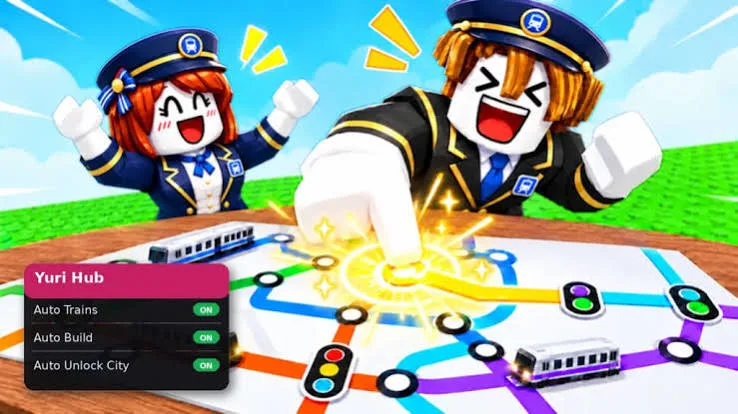
LINE UP! Metro Tycoon Script is an automation toolkit designed to simplify railway management, train purchases, construction, and city development in Roblox. It includes features that help automate driving activities, build railway infrastructure, unlock new cities, purchase trains, and manage repairs. These options can reduce repetitive tasks while you work toward expanding your transportation network.
The script also provides movement adjustments, camera customization, visual enhancements, and performance settings. Additional utilities such as Auto Reconnect, Auto Execute, and Anti-AFK help manage longer gameplay sessions. Whether you want to develop railway stations, improve your trains, or unlock new cities, its features cover several important parts of tycoon progression.
Table of Contents
About LINE UP! Metro Tycoon
LINE UP! Metro Tycoon is a Roblox tycoon game where players build railway networks, connect stations, transport passengers, and expand growing cities. Your goal is to develop an efficient transportation system that generates income and helps you create a larger railway empire.
You can begin in an available city and gradually improve its railway infrastructure. Building stations, connecting routes, purchasing better trains, and increasing passenger capacity are important steps toward earning more money. You can then invest your earnings in station upgrades and famous landmarks to improve your cities.
The game also takes you through different locations around the world, including South Korea, Japan, Hong Kong, and the United States. Each expansion provides new opportunities to unlock cities, construct railway routes, and develop your transportation network.
LINE UP! Metro Tycoon Script 2026
LINE UP! Metro Tycoon Script Barrage Hub | AUTO PROGRESS, AUTO BUILD, AUTO TRAINS, AUTO DRIVE
loadstring(game:HttpGet("https://barrage.cc/loader"))()LINE UP! Metro Tycoon Script Yuri Hub | Auto Build, Auto Trains
loadstring(game:HttpGet("https://raw.githubusercontent.com/iLove-yuri/leeeeesbian/refs/heads/main/homumado.lua"))()Also check : Boss Fight For Eggs Script
What Is LINE UP! Metro Tycoon Script?
LINE UP! Metro Tycoon Script is a third-party Roblox automation tool that provides different functions for railway operations and tycoon progression. Instead of completing every activity manually, players can use its available options to automate selected tasks.
For example, Auto Drive handles driving-related activities, while Auto Build and Auto Stations help with railway construction and infrastructure development. Other features support train purchases, city unlocking, repairs, landmark construction, and city-tier progression.
It also includes character movement controls, camera settings, visual adjustments, and performance options. Session utilities such as Auto Reconnect and Auto Execute provide additional convenience when managing longer gameplay sessions.
LINE UP! Metro Tycoon Script Features
1. Railway and Train Automation
Building a successful railway network requires managing trains, stations, and transportation activities. The railway automation features help simplify several of these responsibilities.
Available options include:
- Auto Drive: Automates supported driving-related activities.
- Auto Buy Trains: Automatically purchases available trains.
- Auto Trains: Handles supported train-related activities.
- Auto Stations: Automates station-related construction and progression.
- Auto Repair: Automatically handles available repair tasks.
These features can reduce the manual effort involved in maintaining and developing your railway system.
2. Auto Build and City Development
Expanding your transportation network involves constructing infrastructure, unlocking new locations, and improving existing cities. The construction features help automate selected development activities.
The available options include:
- Auto Build: Automates supported building activities.
- Auto Landmarks: Handles landmark-related construction.
- Auto City Tier: Automates city-tier progression.
- Auto Unlock City: Automatically unlocks available cities.
- Auto Exchange: Automates supported exchange activities.
These options can make city expansion more convenient as you progress through the game.
3. Auto Farm and Progression
Earning money is an important part of developing your railway empire. Auto Farm helps automate supported farming activities, allowing you to focus less on repetitive progression tasks.
The feature is designed to support your overall tycoon development by helping you work toward railway improvements, new trains, station construction, and city expansions.
4. Movement and Character Modifications
The script includes several character movement settings that let you adjust how your character moves around the game world.
- WalkSpeed: Changes your character’s walking speed.
- JumpPower: Adjusts jumping strength.
- TPWalk: Provides teleport-based walking movement.
- HipHeight: Changes your character’s height relative to the ground.
- NoClip: Allows movement through certain solid objects.
- Gravity: Provides an option to customize gravity.
- Anti Knockback: Includes protection intended to reduce knockback effects.
- Auto Jump: Automates jumping activities.
These settings offer additional control over character movement and navigation.
5. Camera and Visual Settings
Camera and visual adjustments can change how you view the railway environment. The script includes several options for customizing the appearance and visibility of the game.
Available settings include:
- Camera Zoom: Adjusts the camera’s zoom level.
- Field of View: Changes the camera’s field of view.
- Fullbright: Brightens the game environment.
- No Fog: Removes or reduces fog effects.
- Time Of Day: Provides time-of-day customization.
- Instant Prompt: Speeds up supported ProximityPrompt interactions.
These features provide more flexibility when viewing and interacting with different parts of the game.
6. Performance Optimization
Large railway networks and detailed environments may place additional demands on your device. The performance settings provide options intended to reduce graphical workload and adjust frame-rate behavior.
The available features include:
- FPS Boost: Provides an option aimed at improving frame rates.
- Set Max FPS: Lets you configure the maximum frame rate.
- Disable 3D Rendering: Turns off 3D rendering to reduce graphical processing.
- No Gameplay Paused: Prevents gameplay from pausing under supported conditions.
The results may vary depending on your device, Roblox settings, and the script version.
7. Session and Automation Utilities
Long tycoon sessions often involve repeating similar activities over time. The session-management features are designed to make certain processes more convenient.
- Anti-AFK: Helps reduce inactivity-related disconnections.
- Auto Reconnect: Automatically attempts to reconnect after a disconnection.
- Auto Execute: Automatically runs the configured setup.
These utilities can help manage repeated sessions and reduce the need to restart selected processes manually.
How to Use LINE UP! Metro Tycoon Script in Roblox
Third-party Roblox scripts generally require an executor, but unofficial executors and scripts can introduce security risks. They may also stop working after game updates or violate Roblox’s rules.
If you choose to explore third-party scripts, take these precautions:
- Open Roblox and launch LINE UP! Metro Tycoon.
- Check whether the script is compatible with your current game version.
- Review the script source and understand the actions it performs.
- Avoid running unfamiliar code or granting unnecessary permissions.
- Never share your Roblox password, account cookies, or authentication tokens with an executor or script provider.
There is no guarantee that a third-party script will work correctly or protect your account from restrictions.
Is LINE UP! Metro Tycoon Script Worth Using?
LINE UP! Metro Tycoon Script offers a broad collection of automation options for players who want to simplify railway management and city development. Its features cover driving activities, train purchases, station construction, repairs, city unlocking, and landmark development.
The additional movement and visual settings provide more control over character behavior and the game environment. Performance options and session utilities also add convenience for players who spend longer periods developing their railway networks.
However, these are third-party features rather than official game functions. Their compatibility and reliability can vary, so consider the possible account and security risks before using them.
Frequently Asked Questions
What Is LINE UP! Metro Tycoon Script?
LINE UP! Metro Tycoon Script is a third-party Roblox automation toolkit designed for the LINE UP! Metro Tycoon game. It includes features for railway management, train purchases, construction, city expansion, farming, and movement customization.
What Does Auto Drive Do?
Auto Drive automates supported driving-related activities. It is designed to reduce the manual effort involved in railway transportation tasks.
Can the Script Automatically Build Railway Stations?
Yes. The Auto Build and Auto Stations features support automation for building activities and station-related construction or progression.
Does LINE UP! Metro Tycoon Script Support Automatic City Unlocking?
Yes. Auto Unlock City is included to automate the process of unlocking available cities. The script also provides an Auto City Tier feature for city progression.
Can I Automatically Purchase Trains?
The script includes Auto Buy Trains, which is designed to purchase available trains automatically.
Does the Script Have Performance Settings?
Yes. Its performance options include FPS Boost, Set Max FPS, Disable 3D Rendering, and No Gameplay Paused. Their effectiveness depends on your device and the current script version.
What Does Auto Reconnect Do?
Auto Reconnect attempts to reconnect you to the game after a disconnection. It is included as a session-management feature for longer gameplay sessions.
Is LINE UP! Metro Tycoon Script Safe?
No third-party Roblox script or executor can be guaranteed safe. Unofficial tools may contain harmful code, expose account information, or violate Roblox’s rules. Review scripts carefully and never share sensitive account details.
Conclusion
LINE UP! Metro Tycoon Script provides a variety of automation features for players who want to simplify railway operations and city expansion in Roblox. From Auto Drive, Auto Build, and Auto Stations to automatic train purchases, repairs, and city unlocking, it covers many important parts of tycoon progression.
Additional movement controls, visual customization, performance settings, and session-management utilities offer further flexibility. Whether your goal is to develop railway infrastructure, expand into new cities, or manage your transportation network more conveniently, the script brings several different tools together in one package.
Before using any third-party script, remember that compatibility, reliability, and account safety are not guaranteed.